- News
- The NFC Checkpoint – Check-in, Check-out
The NFC Checkpoint – Check-in, Check-out
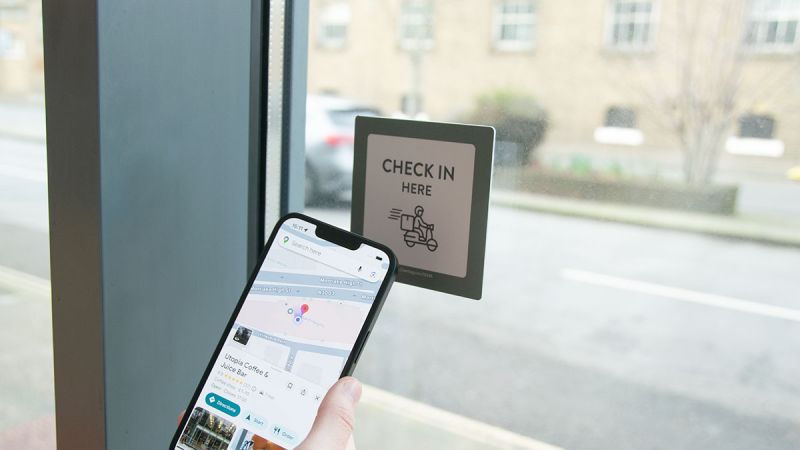
Our NFC Checkpoint tag has been specifically engineered to provide the optimum proof of presence product for deliveries, collections, work-force tracking or site compliance.
Made popular by the Deliveroo touch Checkpoint tag, Seritag are starting to see increased interest in this application across many industries. Managing remote staff can be challenging. Companies often resort to GPS, QR codes, manual sign in or trust to ensure proof of presence. All of these have benefits but all can be misused. GPS spoofing, shared QR codes or unverifiable manual check-ins can cause headaches for businesses that rely on the physical presence of their staff.
What is an NFC checkpoint?
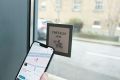
The NFC checkpoint is Seritag’s answer to the issue of unverifiable check-ins. Our NFC checkpoint is a physical NFC tag placed at a fixed location. A simple tap of the phone to the check point which then confirms presence of a user at the location. The touch tags can be used in public locations by courier drivers, deliveries, collections, security personnel and more.
Seritag Checkpoint Tag
The Seritag Checkpoint tag is a double sided, custom printed PVC product. We've designed it so that it can be used as a window sticker or as a regular touch point adhesive tag. The high performance NFC antenna can be easily scanned through most windows without problem.
We've designed this product with 1.2mm PVC which gives strong, stable durability. This is thicker than a standard PVC card but not so thick that it becomes bulky. The antenna and chip is fully integrated into the product so it becomes waterproof and dustproof.
How does an NFC checkpoint work?
1. The NFC checkpoint is installed at a location.
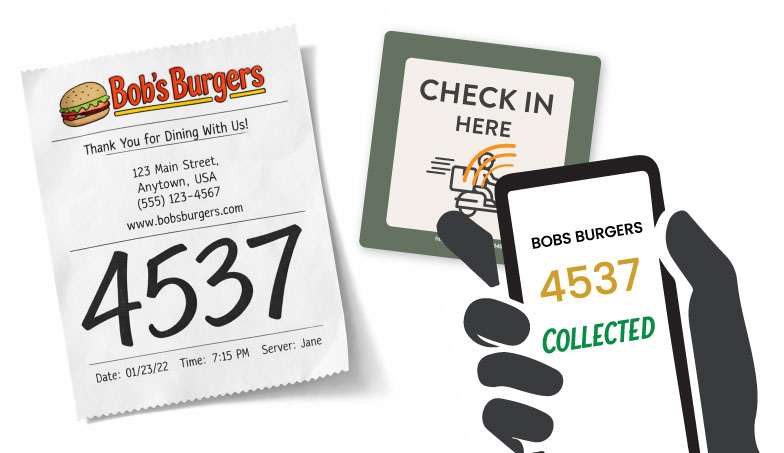
2. The check-in point is scanned by the user’s smartphone.
3. The tap is logged instantly with the time, location and user ID.
4. The data from the check in is then sent securely to your system / database.
Why should I use an NFC checkpoint?
It's easy to use, durable and reliable.
• Secure location verification - no GPS / location spoofing, no QR code sharing.
• Instant, seamless check in - no forms to fill out, no apps to worry about.
• Low maintenance, cost-effective hardware - install once and use it for years.
• High compatibility - works with Apple and Android smartphones.
• Anti-cloning capabilities - when used with an NTAG424 tag and authentication software the data cannot be cloned.
What about use cases ?
While our Checkpoint tag was originally conceived like the Deliveroo check-in tap plate for food delivery drivers, we are now selling them across a wide range of applications. The tag is descrete enough to be used in restaurants but large enough to provide a good scan distance.
Use cases include :
Courier Registration
• Rider arrival confirmation
• Depot and collection point check in
Facility / Site Management
• Contractor attendance
• Security patrol checkpoints
Workforce and Compliance
• Clock-in / clock-out validation
NFC vs QR vs GPS
| Type | Benefits |
|---|---|
| NFC Checkpoint | Requires proof of presence, resistant to tamper or spoofing |
| GPS | Can be spoofed, inaccurate in certain locations i.e. indoors |
| QR-Codes | Can be shared or photographed, cameras can sometimes be clunky or awkward when scanning |
| Written-or-Trust-Based-Methods | Can easily be lied about or falsified, relies far too heavily on trust that can be abused |
Using the NTAG213 or the NTAG424 versions
Both the NTAG213 and NTAG424 variants are great for user presence verification but for true anti-cloning and seamless verification, the NTAG424 takes the product to the next level. NTAG424 chips, as used in the Deliveroo check-in tags, use encryption security to ensure identity. For many users, this may seem complicated but Seritag - with our powerful ixkio tag management platform - makes deployment easy to use.
We can provide the product, handle the encryption encoding, the secure keys and provide a platform that you can either completely use or interface with your own software. We've got experience and knowledge and we can guide you through the process.
Choosing the size
The larger tags at 100mm will scan better than the smaller tags at 60mm. To the extent that we would recommend using the 100mm if you plan on using the Checkpoint tag as a window sticker regularly. That said, the 60mm as a 'label' or stick-on check-in tag, works great in an indoor environment.
So how do I place an order?
If this seems like the product for you and your business, then view our Checkpoint NFC product. We are always on hand to answer any questions you may have on the product or the software so don't hesitate to reach out.

A quick intro to NFC tags - what they are, how they are used and the different types of tags

Find the right product in our extensive, hand-picked selection of NFC tags.

Details of our NFC tag encoding services.

How to order ID / QR code printing on your NFC tags.

How you can order a UID scan of your NFC tags.
Latest Articles




- Email: mail@seritag.com
- Tel: + 44 (0) 20 3773 2791